·
5
Min read
Knowledge base for property companies: start with a template
With ready-made knowledge templates you build an AI-ready knowledge base per property – without starting from a blank page. Here's how.
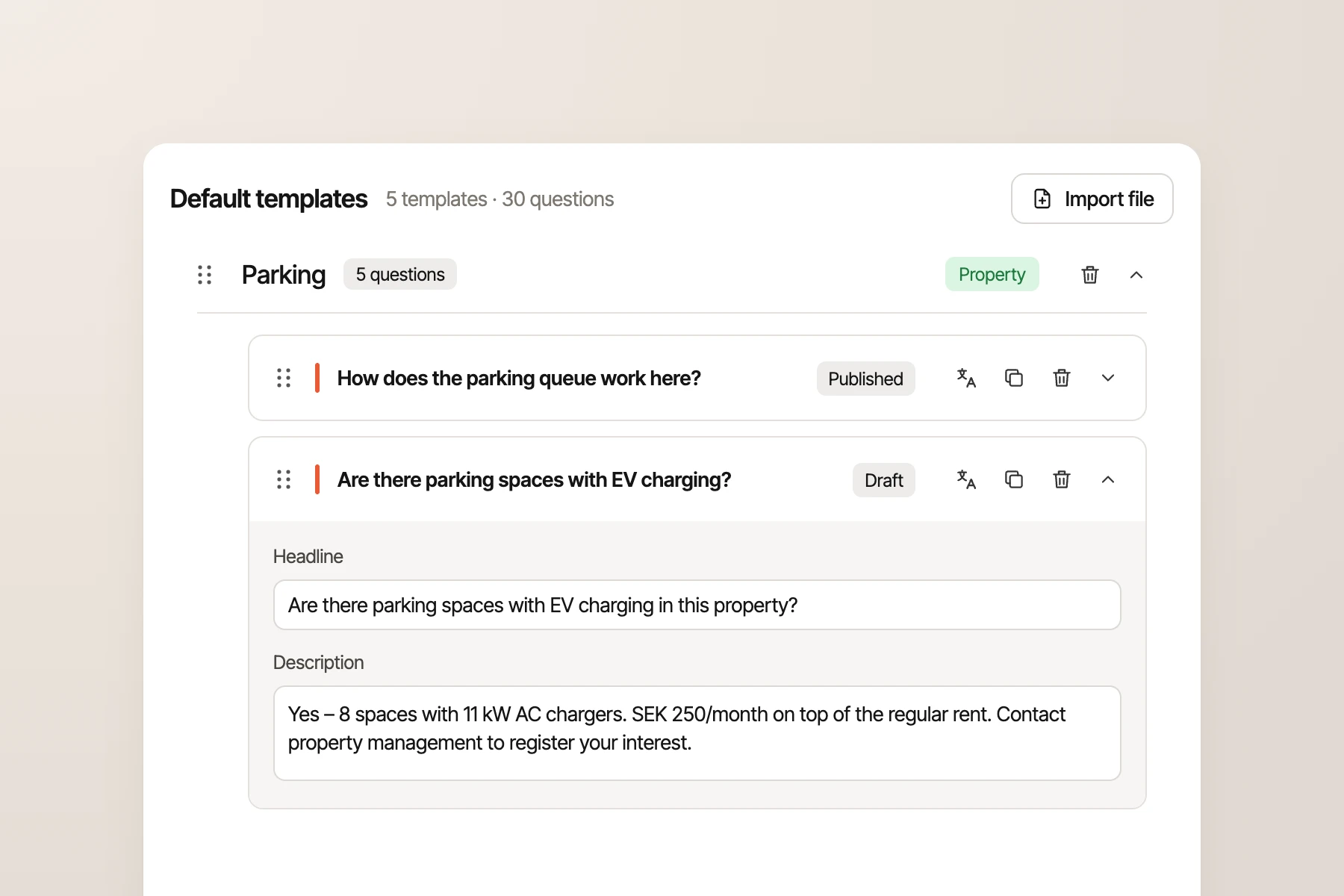
An AI agent in customer service is never better than the knowledge it can draw on. Where is the laundry room? How does the parking barrier work? Which bins apply to my building? Tenants ask questions like these every day, and the answers differ from one property to the next.
Avy is now launching ready-made knowledge templates with the questions tenants ask most often. In this article we go through, step by step, how to build a knowledge base per property and how the templates and the property card help you get started. It applies both to those of you who run customer service and to those who manage the buildings.
Summary
- A knowledge base is the collected, up-to-date information that both AI agents and customer service use to answer tenants.
- In the property sector, knowledge must be able to apply to the whole portfolio, an area, a property or a single stairwell.
- The 10–20 most common questions often account for a large share of all contacts, so start there instead of trying to cover everything.
- Ready-made knowledge templates mean you don't have to start from scratch. You only fill in what is specific to each property.
- A knowledge base needs a clear owner and a plan for updates, otherwise the answers quickly go out of date.
Why an FAQ is not enough
At most property companies the answers already exist, but they are scattered: in a spreadsheet, a Teams channel or in the head of a single property manager. A general FAQ works for questions that are the same for everyone, such as how to submit a maintenance request. But ask how waste collection works, and the answer depends on which building the resident lives in.
An AI that only has a general FAQ can therefore answer only a small share of the questions. The rest become an email or a phone call, and a case that someone has to handle.
How to build an AI-ready knowledge base
The goal is not a perfect knowledge base from day one, but one that covers what residents ask about most and that can be kept up to date. Five steps go a long way:
- Start with volume. Identify your 10–20 most common questions. They often account for a large share of all contacts, so they have the biggest impact first.
- Write for the resident. Use plain language and clear steps, and write all the way to the answer. One question should have one answer.
- Split by portfolio. Decide what applies to everyone and what needs to be answered per area, property or stairwell.
- Let the right person answer. Customer service owns the general answers, while the property manager or caretaker fills in the local ones.
- Appoint an owner. Someone should be responsible for the whole and make sure the knowledge is reviewed regularly.
Step 4 often decides whether the work gets done. Customer service knows which questions come in, but it is the property manager who knows where the pram room is.
Tip: Clean up before you start. If two sources give different answers about the same thing, the AI agent will sometimes give one and sometimes the other.
Start with a template, not a blank page
The hardest part is often step 1: working out which questions to answer. If you start from an empty document, there is a big risk that common questions are missing once the AI agent goes live.
After thousands of conversations with Davy, we know which questions keep coming back. Avy's knowledge templates gather just under 80 standard questions across 11 topics, merged from close to 300 to make them easy to work with, and new questions are added continuously. The most common questions are about:
- Rent and payment: when rent is due, direct debit and what to do if you can't pay.
- Maintenance requests: what counts as a maintenance request, how to submit one and when it will be fixed.
- Contracts and moving: giving notice, subletting and move-in information.
- Shared spaces: laundry room, parking, common room, sauna and storage.
- Access: door codes, keys and barriers.
- Disturbances: what the rules are and who to contact.
The template is a starting point, not a requirement:
- Adapt the questions. Rename them, rephrase them or split a question into several more detailed ones.
- Write the answer once. A suggested answer can have placeholders for what differs, such as where the laundry room is.
- Fill in per property. The property manager fills in the local details directly in Avy, or the answers are imported from a spreadsheet.
- Show only what applies. Questions without an answer are not shown to residents, and a question that isn't relevant, such as parking in a building without parking, can be hidden.
The result is that you cover the most common questions from day one, instead of discovering the gaps only when residents ask.
How Avy handles knowledge
1. Knowledge organised by property structure
In Avy, knowledge can be linked to the whole portfolio, an area, a property or a stairwell. When a resident logs in, the AI agent Davy knows which apartment, building and property it concerns, and which contract the resident has. The answer is therefore based on the resident's own building. Read more about how the AI agents use the knowledge to resolve cases.
2. Property cards and ready-made templates
The property card gathers local information per property: parking, barriers, laundry room and shared spaces. The knowledge templates provide the structure and the property cards hold the answers, so that the AI agent always fetches the answer for the right building.
3. One knowledge base, every channel
The same knowledge is used in the app, in web chat and in email, and by the staff in customer service. It can be entered directly in Avy or fetched from existing web pages and sources such as SharePoint, so you don't have to maintain everything in two places. Posts on the digital notice board, for example about a planned water shut-off, also become knowledge the agent can answer from.
Avy does not replace your property management system. The knowledge base sits on top of the systems you already have, and through the integrations Avy fetches data about residents, contracts and properties where it already lives.
Keep the knowledge alive
A knowledge base is never finished. Buildings are renovated, rules change and new questions come up, so the most important thing is to keep capturing questions that don't have an answer yet.
By following which questions come in and which are resolved directly, you can see where knowledge is missing. With tenant insights you can prioritise the gaps that affect the most residents, instead of guessing. The next step in Avy is a coverage score that shows how large a share of the most common questions your knowledge base can answer, whether the answer is in a property card, in the library or on your website. Once you are live, you see your knowledge gaps instead: questions tenants ask that don't have an answer yet, with the most common first.
Frequently asked questions
What is the difference between an FAQ and a knowledge base?
An FAQ is a list of questions and answers that are the same for everyone. A knowledge base for property companies is organised by portfolio, so the same question can have different answers for different areas, properties and stairwells.
What is a knowledge template?
A knowledge template is a ready-made set of questions that residents often ask, grouped by topic, that you start from when building your knowledge base. In Avy, the templates contain the questions that come up again and again in thousands of Davy conversations, and you fill in the answers per property.
How can an AI agent use the knowledge base?
The AI agent reads the knowledge base when a resident asks a question in the app, in chat or by email. Because the agent knows which property and which contract the resident has, it can choose the knowledge that applies. If it can't answer, it creates a structured case for customer service instead.
What is the difference between a chatbot and an AI agent?
A chatbot answers questions based on what it has access to, often a general FAQ. An AI agent can also do the work: it answers based on the resident's own property, creates and classifies cases and follows them up. Both depend on a good knowledge base.
Want a knowledge base that works?
Avy gathers knowledge per property, gives you ready-made templates to start from and lets the AI agent Davy use it to answer residents around the clock. That means a better tenant experience and fewer cases for customer service. If you want to go deeper, watch our masterclass on AI-ready knowledge bases (in Swedish).
Book a demo and we'll show you how it works.